The Setup
Every confirmed placement triggers two parallel onboarding tracks — one for the client company, one for the consultant. The client needs a Credit Application, an MSA, and a contractor-specific SOW before the engagement is legally live. The consultant needs their onboarding documents and a timesheet link before they can bill. Getting either track wrong delays the start date and signals operational immaturity to both parties.
The Manual Version Was Embarrassing
The placement closes. Everyone's excited. And then the admin work begins: pull the credit application template, fill in the client's details, attach it, write the email, send. Wait for it to come back. Then pull the MSA, fill in the engagement terms, send. Wait. Then the SOW — which requires the contractor's rate, role, start date, and billing cycle to be correct. Then separately, get the contractor's timesheet link set up and sent.
Each document takes 15–20 minutes to pull, fill, attach, and send correctly. Across four documents and two parties, that's the better part of a morning — for a single placement. And every manual step is a chance to send the wrong template, fill in a wrong rate, or forget a step entirely.
What We Built
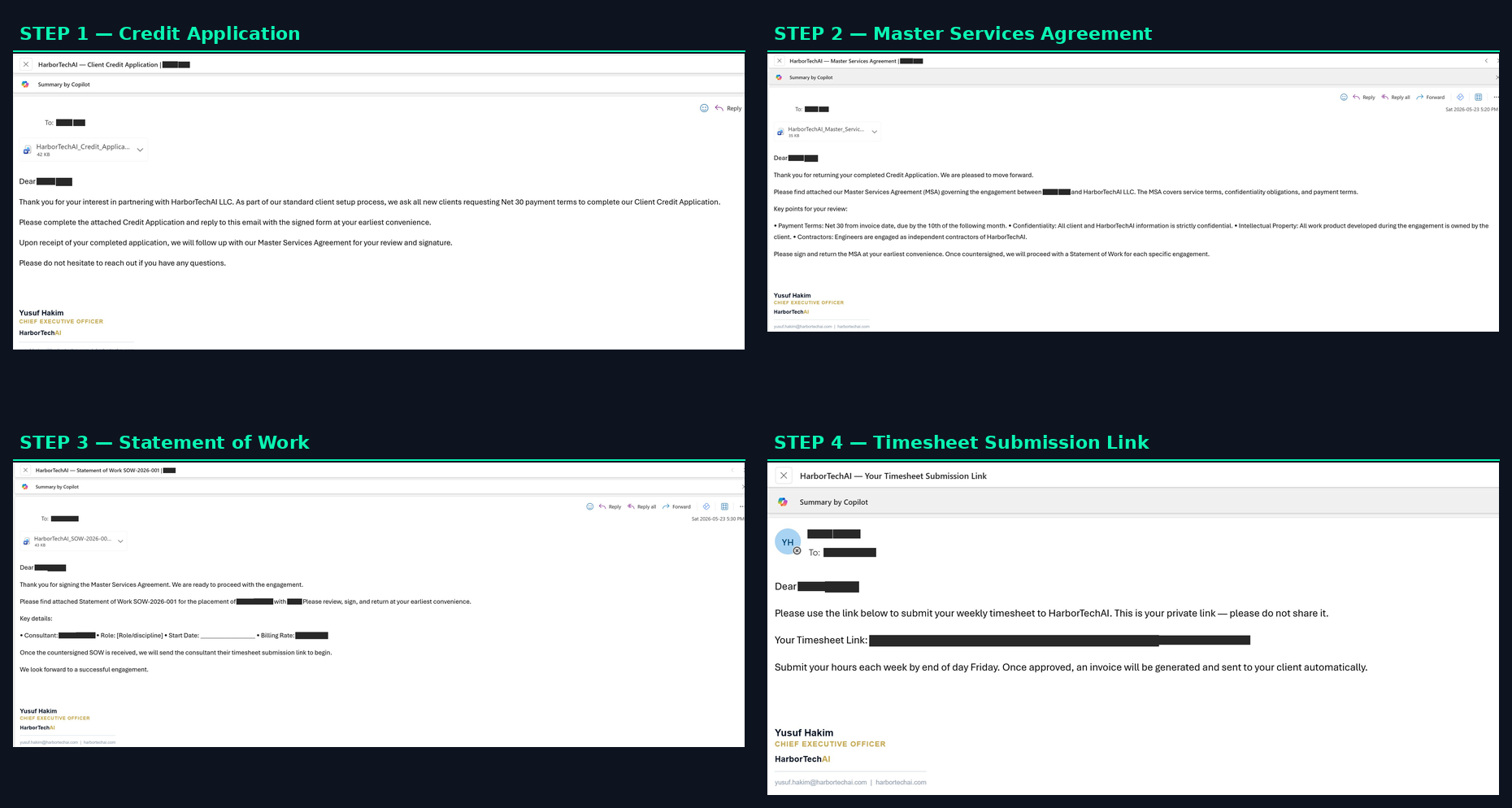
When a placement is confirmed, the onboarding automation handles the full four-step sequence across both parties:
- →Credit Application goes to the client first — establishes payment terms before any legal agreements are exchanged
- →Master Services Agreement follows once the credit application is returned — governs the full engagement relationship
- →Statement of Work sends after the MSA is signed — pre-filled with the contractor's role, rate, start date, and billing cycle pulled directly from the pipeline
- →Timesheet submission link goes to the contractor — their personal link for weekly hour submission, which triggers invoice generation automatically
Each document is pre-filled from the pipeline data. No copy-paste, no manual rate lookup, no wrong template. The agent advances each party through their track as confirmations come in — the client side and the contractor side run in parallel.
The SOW Problem
The SOW is the hardest document to automate because it's contractor-dependent. The client's name, the role, the hourly rate, the billing cycle, the start date — all of it has to be right, and all of it varies per engagement. The manual process relied on whoever was doing the admin to pull the correct figures from whatever notes they had. A wrong rate in the SOW is a billing dispute waiting to happen.
The automation pulls directly from the pipeline tracker — the same source of truth used for candidate management. The SOW that goes to the client has the correct rate and role because it reads from the same row that confirmed the placement. There's no secondary lookup, no re-entry.
What Changed
- →End-to-end onboarding time: from hours of manual admin to triggered automatically on placement confirmation
- →Wrong rate in SOW: hasn't happened since automation went live
- →Documents going out of order: eliminated — the sequence is enforced, not relied upon
- →Timesheet setup delay: gone — the contractor gets their link as part of the same onboarding flow
What We Learned
The hard part wasn't building the automation — it was mapping the process clearly enough to automate it. What triggers the next step? Who confirms? What happens if the credit application comes back incomplete? What if the start date changes after the SOW is sent?
Every edge case required a written rule. Most of those rules existed informally in someone's head. Making them explicit was the real work — and the benefit extended beyond the automation. The process itself became more consistent as a result.
Have a Document Workflow That's Eating Your Week?
If you have a multi-step process with clear inputs and decision logic, it can probably be automated. Book a scoping call and we'll tell you if it's feasible and what it would take.
Book a Scoping Call →